
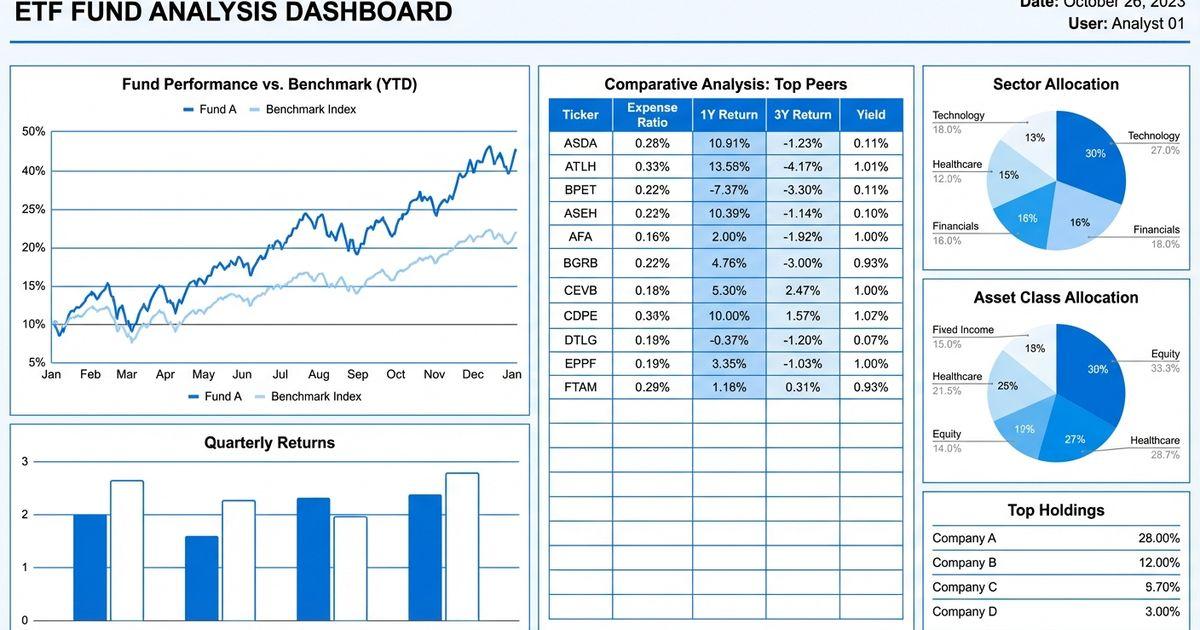
To compare two mutual funds side by side, check five things: total cost (expense ratio plus loads and 12b-1 fees), holdings overlap, returns over several periods, risk-adjusted returns, and tax efficiency. The free FundXLS mutual fund comparison tool puts any two mutual funds next to each other, covering holdings overlap, sector allocations, performance, fees, and key metrics. For ETFs, the ETF overlap calculator does the same for any two ETFs.
This guide explains what to compare, why summary pages can hide large differences, and how to run a comparison in FundXLS.
Why You Need a Fund Comparison Tool
Two funds can look nearly identical on a summary page (similar returns, category, and stated objective) yet hold very different portfolios with different risk profiles.
Consider two hypothetical large-cap funds:
| Metric | Fund A | Fund B |
|---|---|---|
| Category | Large Cap Growth | Large Cap Growth |
| 5-Year Return | 14.2% | 13.8% |
| Expense Ratio | 0.15% | 0.20% |
| AUM | $25B | $30B |
On the surface, they look almost identical. But compare their actual holdings and you might find:
- Fund A has 35% in technology vs Fund B's 28%
- Top 10 holdings overlap is only 40%
- Fund A is concentrated in 50 stocks while Fund B holds 200
- Fund B has significant international exposure that Fund A does not
These differences only emerge when you use a proper comparison tool that goes beyond headline numbers.
What to Compare in Mutual Funds and ETFs
1. Total Cost of Ownership
Expense ratio is not the full picture. True cost includes:
| Cost Component | How to Find It | Impact |
|---|---|---|
| Expense Ratio | Fund prospectus, screener | Direct annual fee |
| Sales Load | Front-end or back-end charge | Can be 1-5% on purchase |
| 12b-1 Fees | Included in expense ratio | Marketing/distribution costs |
| Transaction Costs | Hidden in fund NAV | Portfolio turnover cost |
| Tax Inefficiency | Capital gains distributions | Annual tax drag |
| Bid-Ask Spread | For ETFs at time of trade | Transaction cost |
A mutual fund with a 0.75% expense ratio plus a 5% front-end load costs significantly more than an ETF with a 0.03% expense ratio and no load, even over just 5 years.
2. Holdings Comparison
Holdings comparison shows whether two funds actually own different things. Use a tool that compares full holdings, not just the top 10:
- Common positions: Which stocks appear in both funds?
- Unique positions: What does one fund own that the other does not?
- Weight differences: Even shared stocks may be weighted very differently
- Concentration: How much of the fund is in the top 10, 20, 50 holdings?
The FundXLS Mutual Fund Overlap Calculator and ETF Overlap Calculator each compare two funds' holdings and show the shared positions and weight differences.
3. Performance Across Timeframes
Compare returns across multiple periods to see consistency:
- YTD: Current year momentum
- 1-Year: Recent performance cycle
- 3-Year Annualized: Intermediate trend
- 5-Year Annualized: Full market cycle (includes both bull and bear markets)
- 10-Year Annualized: Long-term track record
- Since Inception: Complete history
A fund that outperformed over 1 year but underperformed over 5 years may have just had a lucky year in a hot sector.
4. Risk Metrics Side by Side
Compare returns alongside risk, because a higher return can come from taking more risk:
| Risk Metric | What It Tells You | Better When |
|---|---|---|
| Sharpe Ratio | Return per unit of risk | Higher |
| Standard Deviation | Volatility of returns | Lower (for same return) |
| Maximum Drawdown | Worst peak-to-trough loss | Smaller |
| Beta | Market sensitivity | Depends on goals |
| Alpha | Excess return above benchmark | Higher |
| R-Squared | How closely tracks benchmark | Higher for index funds |
A fund with 12% returns and a Sharpe ratio of 0.8 generated more return per unit of risk than a fund with 14% returns and a Sharpe ratio of 0.6.
5. Tax Efficiency
For taxable accounts, tax efficiency can be more important than expense ratio:
- Capital gains distributions: How much does the fund distribute in taxable gains?
- Turnover ratio: Higher turnover means more taxable events
- Fund structure: ETFs are generally more tax-efficient than mutual funds due to the in-kind creation/redemption mechanism
- Tax-loss harvesting potential: Can you find a similar fund to swap into for tax savings?
How to Use FundXLS as Your Comparison Tool
Comparing two mutual funds or ETFs side by side
- For mutual funds, go to the FundXLS Mutual Fund Comparison Tool; for ETFs, use the ETF Overlap Calculator or ETF compare
- Enter the two tickers you want to compare
- Review the comparison:
- Percentage of holdings in common
- Unique holdings in each fund
- Weight comparison for shared positions
- Visual overlap diagram
Deep-Dive on Individual Funds
Each fund in FundXLS has its own analysis page (for example, SPY) with tabs such as:
- Holdings: Every position in the fund, not just top 10
- Performance: Multi-timeframe returns with benchmark comparison
- Sectors: Detailed sector allocation breakdown
- Geography: Country and region exposure
- Dividend: Yield, growth, distribution history
- Tax: Tax efficiency metrics
- Peers: Similar funds ranked by various criteria
Portfolio-Level Comparison
If you are comparing two potential portfolio configurations, upload each to Portfolio X-Ray:
- Health Score: Which portfolio configuration is stronger overall?
- Efficient Frontier: Which sits closer to the optimal risk/return tradeoff?
- Sharpe Ratio: Which delivers more return per unit of risk?
- Max Drawdown: Which would lose less in a worst-case scenario?
- Aggregate Overlap: Which has better actual diversification?
Mutual Fund vs ETF: The Comparison That Matters Most
A common comparison is a traditional mutual fund against an ETF alternative, usually when considering a switch from a higher-cost mutual fund to a low-cost ETF.
Key Differences
| Feature | Traditional Mutual Fund | ETF |
|---|---|---|
| Trading | End of day NAV | Throughout the day |
| Minimum investment | Often $1,000-$3,000 | Price of one share |
| Expense ratios | 0.50-1.50% typical | 0.03-0.50% typical |
| Sales loads | Some share classes (front/back end) | None |
| Tax efficiency | Lower (capital gains distributions) | Higher (in-kind mechanism) |
| Transparency | Monthly/quarterly holdings | Daily holdings |
| Automatic investing | Yes (dollar amounts) | Requires whole shares |
| Available in 401k | Usually yes | Sometimes no |
When Mutual Funds Still Make Sense
- 401k plans: Your employer plan may only offer mutual funds
- Automatic investing: Dollar-cost averaging with exact dollar amounts
- Active management access: Some top active managers only run mutual funds
- Institutional share classes: Available to large accounts with very low fees
Share class choice is worth measuring rather than assuming, because the classes hold one portfolio at different prices. Our data study of share class cost gaps across five fund families puts the ten year difference at 0.09 to 1.27 percentage points a year.
When to Switch to ETFs
- Taxable accounts: ETFs' tax efficiency advantage compounds over time
- High-fee mutual funds: Any mutual fund charging more than 0.50% likely has a cheaper ETF alternative
- Load funds: A no-load ETF tracking a similar strategy avoids the sales charge
- Transparency: You want to know exactly what you own daily
Fund Comparison for Tax-Loss Harvesting
One specialized use of fund comparison tools is finding replacement funds for tax-loss harvesting:
The Process
- Identify a losing position: A fund currently below your purchase price
- Find a similar replacement: Same asset class, but not "substantially identical" under wash-sale rules (confirm with your tax adviser)
- Compare the candidates: Use the FundXLS overlap calculator to check how similar the holdings are
- Execute the swap: Sell the losing fund, buy the replacement
- Harvest the tax loss: Deduct up to $3,000/year against ordinary income
Finding Replacement Funds
The FundXLS Tax-Loss Harvesting Tool suggests similar funds with:
- High correlation to your original holding
- A different index provider (whether that satisfies wash-sale rules is a question for your tax adviser)
- Comparable expense ratios and liquidity
- Similar sector and geographic exposure
How Financial Advisors Use Fund Comparison Tools
Client Portfolio Reviews
Financial advisors use fund comparison tools during quarterly client reviews to:
- Evaluate current holdings: Has the fund drifted from its stated strategy? Have expenses changed?
- Identify better alternatives: New, lower-cost ETFs launch regularly. A fund comparison shows if a switch is warranted.
- Check overlap across client accounts: A client with both an IRA and brokerage account might own overlapping funds without realizing it.
- Document due diligence: Regulators require advisors to demonstrate they selected funds in the client's best interest.
Model Portfolio Construction
Many advisory firms build model portfolios that they deploy across all clients with similar risk profiles. The construction process involves:
- Screening: Use the FundXLS ETF Screener to identify candidates for each allocation bucket
- Comparing: Run head-to-head comparisons of top candidates using the Overlap Calculator
- Portfolio analysis: Test the combined portfolio in Portfolio X-Ray for health score and risk metrics
- Documentation: Generate reports showing the analysis behind each fund selection
401k Plan Analysis
Advisors reviewing employer retirement plans use fund comparison tools to:
- Compare the plan's fund lineup against lower-cost alternatives
- Identify gaps in the plan's investment options
- Recommend additional funds to plan sponsors
- Evaluate whether the plan's target-date funds are competitive
Common Fund Comparison Mistakes
Comparing Across Different Categories
Comparing a large-cap growth fund against a small-cap value fund tells you little, because they serve different portfolio roles. Always compare funds within the same category and purpose.
Ignoring Survivorship Bias
Fund databases only show current funds. The worst-performing funds get merged or closed, making the average surviving fund look better than it actually is. Compare against benchmarks, not just other funds.
Overweighting Short-Term Performance
A fund that outperformed over the last 6 months might be taking excessive risk. Always compare risk-adjusted returns (Sharpe ratio) across full market cycles (5+ years).
Forgetting to Check Holdings
Two "S&P 500 Index" funds should be nearly identical, but some "large cap blend" funds with similar names hold very different portfolios. Always verify with a holdings comparison tool.
Step-by-Step: Comparing Two Funds in FundXLS
Here is a practical walkthrough comparing two popular dividend ETFs — SCHD and VYM:
Step 1: Check Overlap
Go to the FundXLS Overlap Calculator and enter both tickers. The calculator shows the shared holdings and how much of each fund's weight they represent.
Step 2: Compare Individual Pages
Visit each fund's detail page:
- SCHD Analysis — Quality-focused dividend growth
- VYM Analysis — Yield-focused, broader holdings
Compare the Holdings tabs side by side. SCHD tracks an index of about 100 dividend stocks, while VYM holds several hundred. The more concentrated fund carries more stock-specific risk.
Step 3: Performance Comparison
Check the Performance tabs across 1, 3, 5, and 10 years. Which fund leads changes by period, so compare total return (not just yield) over the same windows.
Step 4: Portfolio Fit
If both funds are candidates for your portfolio, run your entire portfolio through Portfolio X-Ray with each option to see which improves your overall health score, Sharpe ratio, and diversification.
Frequently Asked Questions
What is the best mutual fund comparison tool?
The right tool depends on what you need to compare. The free FundXLS mutual fund comparison tool compares two mutual funds on holdings overlap, sector allocation, performance, and fees, and the ETF overlap calculator does the same for ETFs. Brokerage and research sites such as Morningstar also offer fund comparisons with their own data and features.
How do I compare mutual fund fees accurately?
Look beyond the expense ratio. Total cost includes sales loads (front-end or back-end), 12b-1 marketing fees, transaction costs from portfolio turnover, and tax drag from capital gains distributions. The cheapest fund by expense ratio may not be the cheapest when all costs are considered. Use the FundXLS ETF Screener to filter by expense ratio and find the most cost-effective options.
Should I switch from mutual funds to ETFs?
In taxable accounts, switching to ETFs usually saves money long-term through lower fees and better tax efficiency. However, the switch itself may trigger capital gains taxes on your mutual fund positions. Calculate the breakeven point — if the annual savings from lower ETF fees recover the switching tax cost within 3-5 years, the switch makes financial sense. In tax-advantaged accounts (IRA, 401k), there are no tax consequences to switching.
How do I know if two funds overlap?
Use the FundXLS Mutual Fund Overlap Calculator or ETF Overlap Calculator to see the shared holdings and overlap percentage for any two funds. As a rough rule of thumb, overlap below 20% suggests the funds add diversification, overlap above 50% suggests you may be paying two sets of fees for similar exposure, and overlap above 80% means the funds are near-duplicates.
Can I compare funds from different providers in one tool?
Yes. FundXLS compares funds regardless of provider (for example Vanguard, iShares, SPDR, Schwab, and Invesco), so you are not limited to one fund family's lineup.
What metrics matter most when comparing funds?
Holdings overlap is often overlooked; it shows whether two funds are truly different or hold the same stocks. Beyond overlap, compare expense ratio, risk-adjusted returns (Sharpe ratio), tracking error (for index funds), tax efficiency, and sector concentration. Raw past performance is the least reliable comparison metric.
FundXLS tools for comparing funds
- Mutual Fund Comparison Tool: two mutual funds side by side
- Mutual Fund Overlap Calculator and ETF Overlap Calculator: shared holdings and overlap percentage
- Mutual Fund Screener and ETF Screener: find candidates by cost, category, and performance
- Portfolio X-Ray: test the combined portfolio
For investors who analyze funds in Excel, MarketXLS provides functions such as =Last("VOO"), =DividendYield("SCHD"), =FundExpenseRatio("VTV"), and =FundHoldings("VTV") to pull fund data into spreadsheets for custom comparison models. This article is educational and is not investment advice.
