
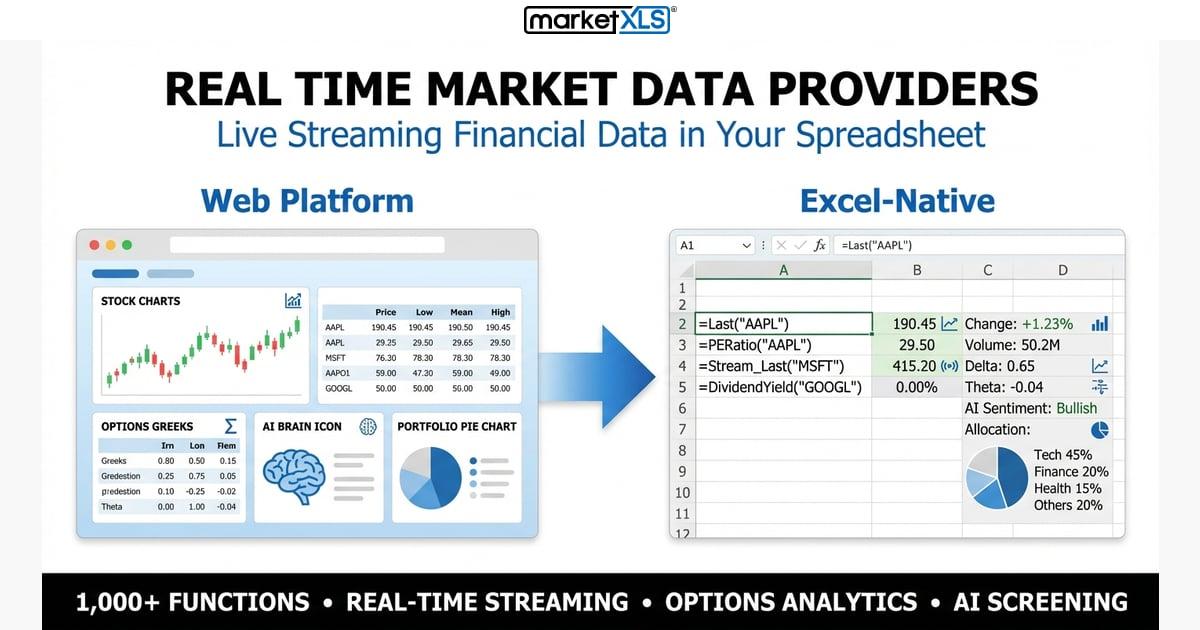
Real time market data providers are the backbone of modern investing and trading. Whether you are a retail investor tracking a personal portfolio, a financial analyst building models, or a hedge fund executing algorithmic strategies, the quality, speed, and cost of your market data directly impact your results. This guide provides an honest, detailed comparison of the leading real time market data providers — covering what each offers, what it costs, and which type of user each serves best.
Why Your Choice of Market Data Provider Matters
The market data provider you choose affects every aspect of your investment process:
- Data accuracy: Incorrect or delayed data leads to wrong decisions. A provider sourcing directly from exchanges with proper validation processes delivers more reliable information.
- Latency: For active traders, even milliseconds matter. For long-term investors, 15-minute delays may be perfectly acceptable.
- Coverage: Some providers cover only US equities. Others include global markets, options, futures, forex, and cryptocurrencies.
- Integration: How does the data reach your workflow? Direct Excel integration, API access, a proprietary terminal, or CSV exports all have different implications for efficiency.
- Cost: Market data pricing spans from free (with limitations) to tens of thousands of dollars per month. The right choice balances your data needs against your budget.
Major Real Time Market Data Providers Compared
Bloomberg Terminal
Bloomberg is the gold standard for institutional market data. The Bloomberg Terminal provides access to virtually every financial instrument globally, with real-time pricing, news, analytics, messaging, and execution capabilities.
Strengths:
- Unmatched data breadth — equities, fixed income, derivatives, commodities, FX, crypto
- Proprietary news and research
- Bloomberg Messaging for institutional communication
- Extensive historical data going back decades
- Professional-grade analytics and charting
Limitations:
- Approximately $2,000+/month per terminal — prohibitive for individual investors
- Requires proprietary hardware or dedicated software
- Excel integration via separate Bloomberg add-in (BDH, BDP functions) requires terminal subscription
- Steep learning curve — the keyboard shortcuts and interface take months to master
Best for: Large institutions, investment banks, hedge funds with significant budgets.
Refinitiv (formerly Thomson Reuters)
Refinitiv Eikon is Bloomberg's primary institutional competitor, offering similar breadth of data with a different user experience.
Strengths:
- Comprehensive global coverage across all asset classes
- Strong fixed income and FX data
- Refinitiv Workspace provides a modern interface
- Excel integration via Eikon add-in
- Extensive fundamental data for company analysis
Limitations:
- Pricing is comparable to Bloomberg — typically $1,500+/month
- Less ubiquitous than Bloomberg in many markets, which can limit networking benefits
- Data delivery can have higher latency than Bloomberg for certain markets
Best for: Institutions that need global coverage, especially in fixed income and FX markets.
FactSet
FactSet focuses on investment management and research, providing data alongside powerful analytics tools.
Strengths:
- Excellent for portfolio analytics and risk management
- Strong company fundamental data
- Good Excel integration with FactSet formulas
- Customizable dashboards and workflows
- Growing quant/programmatic capabilities
Limitations:
- Pricing typically $1,000+/month per user
- Less real-time trading focus than Bloomberg — more oriented toward research
- Smaller user community means fewer shared resources and templates
Best for: Buy-side firms (asset managers, mutual funds) focused on research and portfolio analytics.
IEX Cloud
IEX Cloud provides market data via API, targeting developers and technology-focused users.
Strengths:
- Developer-friendly REST API
- Transparent, usage-based pricing
- Free tier available with limited data
- Clean documentation and modern approach
- Good for building custom applications
Limitations:
- Primarily US equities — limited international coverage
- No native Excel integration — requires programming knowledge (Python, JavaScript)
- Real-time data requires paid plans
- Limited fundamental data compared to Bloomberg or FactSet
- No options chain data in basic tiers
Best for: Developers building fintech applications, quant traders with programming skills, tech-savvy individual investors.
MarketXLS
MarketXLS delivers professional market data directly inside Excel, bridging the gap between expensive institutional tools and free but limited alternatives.
Strengths:
- Native Excel add-in — data flows directly into cells via simple formulas
- Real-time data via QuoteMedia exchange feed
- Comprehensive coverage: stocks, options, ETFs, fundamentals, technicals
- 1,100+ Excel functions covering price data, financial statements, technical indicators, and options
- Streaming capability with
=Stream_Last()and=QM_Stream_Last() - Historical data with
=GetHistory()and=QM_GetHistory() - Full option chains with
=QM_GetOptionChain()and Greeks with=QM_GetOptionQuotesAndGreeks() - Significantly more affordable than Bloomberg, Refinitiv, or FactSet
- Pre-built templates for common workflows
Limitations:
- Focused on US markets primarily
- Requires Microsoft Excel (Windows; some functions available for Mac and Excel Online)
- Not designed for ultra-low-latency algorithmic trading
- Smaller dataset than Bloomberg for esoteric instruments
Best for: Individual investors, RIAs, financial analysts, and small funds who work in Excel and need professional-grade data without institutional pricing.
Detailed Comparison Table
| Feature | Bloomberg | Refinitiv | FactSet | IEX Cloud | MarketXLS |
|---|---|---|---|---|---|
| Monthly cost | $2,000+ | $1,500+ | $1,000+ | Free–$500 | See pricing |
| Real-time data | Yes | Yes | Yes | Paid plans | Yes (QuoteMedia) |
| Excel integration | Bloomberg add-in | Eikon add-in | FactSet add-in | API only | Native add-in |
| US equities | ✅ | ✅ | ✅ | ✅ | ✅ |
| Global markets | ✅ | ✅ | ✅ | Limited | US focused |
| Options data | ✅ | ✅ | ✅ | Limited | ✅ Full chains + Greeks |
| Fundamentals | ✅ Extensive | ✅ Extensive | ✅ Excellent | Basic | ✅ 1,100+ functions |
| Technical indicators | ✅ | ✅ | ✅ | ❌ | ✅ 100+ indicators |
| Historical data | 30+ years | 20+ years | 20+ years | 5-15 years | 20+ years |
| Streaming | ✅ | ✅ | ✅ | WebSocket API | ✅ (=Stream_Last) |
| Setup complexity | High | High | Medium | High (coding) | Low |
| Target user | Institutions | Institutions | Asset managers | Developers | Individuals to small funds |
Understanding Market Data Tiers
Market data providers generally fall into three tiers based on the quality, speed, and breadth of data they deliver.
Tier 1: Institutional-Grade
Bloomberg, Refinitiv, and FactSet represent Tier 1 providers. They offer:
- Direct exchange feeds with minimal latency
- Global coverage across every asset class
- Proprietary analytics, news, and research
- Enterprise-grade compliance and audit trails
The trade-off is cost. These providers charge thousands per month per user, and total costs including exchange fees, additional modules, and implementation can be even higher.
Tier 2: Professional-Grade
MarketXLS and similar providers occupy Tier 2. They deliver:
- Real-time data from professional feeds (QuoteMedia in MarketXLS's case)
- Broad coverage of major asset classes (equities, options, ETFs)
- Integrated analytics via Excel functions
- Significantly lower cost than Tier 1
For the vast majority of individual investors, financial advisors, and small firms, Tier 2 provides all the data needed for informed decision-making at a fraction of the cost.
Tier 3: Basic/Free
Yahoo Finance, Google Finance, and free API tiers (like IEX Cloud's free plan) represent Tier 3:
- Often delayed data (15-20 minutes)
- Limited or no Excel integration
- Restricted historical data
- No streaming capability
- Suitable for casual portfolio monitoring but not active trading or professional analysis
Key Factors When Choosing a Provider
1. What Asset Classes Do You Trade?
If you only trade US equities and options, you do not need Bloomberg's global coverage. MarketXLS covers US stocks, options, ETFs, and mutual funds comprehensively. If you trade European or Asian markets, you may need a provider with broader international coverage.
2. How Do You Consume Data?
If Excel is your primary tool, a provider with native Excel integration saves enormous time. Bloomberg, Refinitiv, FactSet, and MarketXLS all offer Excel add-ins. IEX Cloud requires programming. If you build custom applications, API access matters more than Excel integration.
3. What Is Your Latency Tolerance?
High-frequency traders need sub-millisecond data delivery. Swing traders and portfolio managers can work with data that refreshes every few seconds. Long-term investors are fine with 15-minute delays. Match your provider's latency to your actual needs — paying for ultra-low latency you do not use is wasteful.
4. What Is Your Budget?
Be honest about what you can afford consistently. A $2,000/month Bloomberg subscription that strains your budget creates pressure. A more affordable provider that covers 95% of your needs for a fraction of the cost may be the smarter choice long-term.
5. Do You Need Options Data?
Not all providers offer comprehensive options data. MarketXLS provides full option chains via =QM_GetOptionChain() and Greeks via =QM_GetOptionQuotesAndGreeks(). Bloomberg and Refinitiv also provide deep options data, but at much higher cost. IEX Cloud's options data is limited.
How MarketXLS Delivers Real Time Market Data in Excel
MarketXLS connects to QuoteMedia's professional data feed to deliver market data directly into Excel cells. Here is how the key functions work:
Price Functions
=Last("AAPL")              → Current stock price (snapshot)
=QM_Last("AAPL")           → Current price via QuoteMedia
=Stream_Last("AAPL")       → Continuously streaming price
=QM_Stream_Last("AAPL")    → Streaming price via QuoteMedia
Fundamental Functions
=PERatio("AAPL")            → Price-to-earnings ratio
=MarketCapitalization("AAPL") → Market cap
=Revenue("AAPL")            → Revenue
=DividendYield("AAPL")      → Dividend yield
Historical Functions
=GetHistory("AAPL", "2024-01-01", "2025-01-01", "daily")
=QM_GetHistory("AAPL")
Options Functions
=QM_GetOptionChain("AAPL")
=QM_GetOptionQuotesAndGreeks("AAPL")
=OptionSymbol("AAPL", "2026-03-21", "C", 230)
Technical Functions
=RSI("AAPL")
=SimpleMovingAverage("AAPL", 50)
This breadth of functions — over 1,100 in total — makes MarketXLS one of the most comprehensive Excel-based market data solutions available.
Data Accuracy and Reliability: How Providers Ensure Quality
All reputable real time market data providers invest heavily in data quality. Here is how they maintain accuracy:
Multi-Source Validation
Professional providers receive data from multiple exchange feeds simultaneously. When discrepancies appear between sources, automated systems flag the anomaly and cross-reference against other feeds before delivering the data to end users. This redundancy prevents erroneous ticks from corrupting your analysis.
Continuous Monitoring
Automated systems monitor data streams 24/7 for anomalies such as price spikes that deviate significantly from recent trading ranges, zero-volume ticks, or timestamps that arrive out of sequence. When anomalies are detected, the data is quarantined until verified.
Exchange Direct Feeds vs. Consolidated Feeds
Tier 1 providers like Bloomberg typically receive direct exchange feeds, which provide the fastest and most granular data. Tier 2 and Tier 3 providers often use consolidated feeds that aggregate data from multiple exchanges. For most trading and analysis purposes, consolidated feeds provide more than adequate accuracy and timeliness.
Data Normalization
Different exchanges format data differently. Providers normalize this data into consistent formats — standardizing ticker symbols, date formats, price decimal places, and corporate action adjustments. MarketXLS handles all of this normalization automatically, so when you type =Last("AAPL"), you get a clean, accurate price regardless of which exchange the last trade occurred on.
Historical Data Adjustments
Reliable providers adjust historical data for stock splits, dividends, and other corporate actions. This ensures that historical analysis and backtesting produce accurate results. MarketXLS's =GetHistory() and =QM_GetHistory() functions return properly adjusted data by default.
Making Your Decision
There is no single "best" market data provider — only the best provider for your specific needs. Here is a decision framework:
Choose Bloomberg or Refinitiv if: You are at an institution with budget for $2,000+/month, need global multi-asset coverage, and value proprietary research and messaging networks.
Choose FactSet if: You are in asset management, prioritize portfolio analytics and fundamental research, and work within an institutional setting.
Choose IEX Cloud if: You are a developer building fintech applications and need API-first data delivery with transparent pricing.
Choose MarketXLS if: You work in Excel, need professional-grade US market data (stocks, options, ETFs, fundamentals, technicals) at an accessible price point, and want data flowing into your spreadsheets with simple formulas.
Get started with MarketXLS to explore how real-time market data integrates directly into your Excel workflow. Visit the pricing page to compare plans.
Frequently Asked Questions
Who are the major real time market data providers?
The leading providers include Bloomberg Terminal, Refinitiv (formerly Thomson Reuters), FactSet, IEX Cloud, and MarketXLS. Bloomberg and Refinitiv dominate institutional markets, FactSet serves asset managers, IEX Cloud targets developers, and MarketXLS provides professional data directly in Excel at a more accessible price point.
How much does real time market data cost?
Costs range widely. Bloomberg Terminal runs approximately $2,000+/month, Refinitiv $1,500+/month, FactSet $1,000+/month. IEX Cloud offers free tiers with limited data and paid plans up to $500/month. MarketXLS provides real-time data at significantly lower cost — see the pricing page for current plans.
Can I get real time market data in Excel?
Yes. Bloomberg, Refinitiv, FactSet, and MarketXLS all offer Excel add-ins. MarketXLS is specifically designed for Excel integration with functions like =Last(), =Stream_Last(), =PERatio(), and =QM_GetOptionChain() that pull data directly into cells.
What is the difference between real-time and delayed market data?
Real-time data reflects the latest trades and quotes as they happen on the exchange. Delayed data is typically 15-20 minutes behind. Free sources like Yahoo Finance generally provide delayed data. Real-time data requires a data subscription or exchange agreement.
Do I need real time data, or is delayed data sufficient?
It depends on your trading style. Day traders and active options traders need real-time data. Swing traders can often work with data that refreshes every few minutes. Long-term investors and portfolio managers may find delayed data or end-of-day data sufficient for their decision-making.
What should I look for in a market data provider for options trading?
For options trading, you need full option chain data (all strikes and expirations), real-time or near-real-time pricing, Greek calculations (delta, gamma, theta, vega), implied volatility data, and streaming capability. MarketXLS provides all of these through functions like =QM_GetOptionChain() and =QM_GetOptionQuotesAndGreeks().
Summary
Real time market data providers serve different segments of the market based on data breadth, delivery method, latency, and cost. Bloomberg and Refinitiv lead the institutional space with comprehensive global coverage at premium prices. FactSet excels in portfolio analytics for asset managers. IEX Cloud serves developers with API-first delivery. MarketXLS bridges the gap between institutional quality and accessibility by delivering professional-grade market data — including stocks, options, ETFs, fundamentals, and technical indicators — directly into Excel through over 1,100 functions. The best choice depends on your specific needs: what you trade, how you analyze data, and what you can invest in your data infrastructure. For Excel-based investors and analysts, MarketXLS offers the most efficient path to professional market data.
