
Streaming Functions
Stream real-time market data directly to Excel cells with Quotemedia's streaming functions.
What are Streaming Functions?
Simplified Functions
To make it easier for you, we have also created some extra functions which only take one argument which is the symbol. So, instead of using =qm_stream_value("last","symbol"), you can also use =qm_stream_last("symbol").
Available Functions
To see the list of all streaming functions simply start typing in any Excel cell
=qm_stream_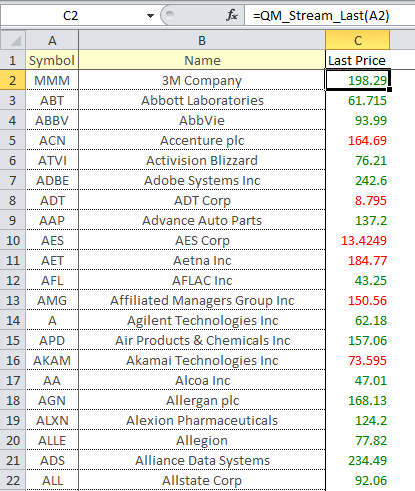
Visual Feedback
Category: Quotemedia Stream Real-Time Functions
Important:
This category of functions results in values changing by themselves without you having to Refresh the data. A connection is made in the background to the servers and whenever the new data points arrive its shown in the cell.
Function Format
The prefix for functions in this category is:
=qm_stream_The main function in this category is =qm_stream_value("What do you want to stream", "For which symbol you want to stream"). For example, to stream the last price of a stock type =qm_stream_value("last", "symbol")
Shorthand Functions
Just like in =qm_value function we have pre-packaged if you like some of the commonly streamed values as extra functions that take only one argument which is the symbol.
Example:
=qm_stream_value("last","symbol")is same as=qm_stream_last("symbol")Available Data Points
Last Price
=qm_stream_last("MSFT")Get the last traded price
Bid Price
=qm_stream_bid("MSFT")Get the current bid price
Ask Price
=qm_stream_ask("MSFT")Get the current ask price
Volume
=qm_stream_volume("MSFT")Get the trading volume
Key Features
- Automatic Updates: Data refreshes automatically without manual intervention
- Background Connection: Maintains server connection for continuous data flow
- Visual Indicators: Cells change color based on value changes
- Multiple Data Points: Stream various market data types (price, volume, bid, ask, etc.)
- Easy to Use: Simple function syntax with symbol as the only required argument