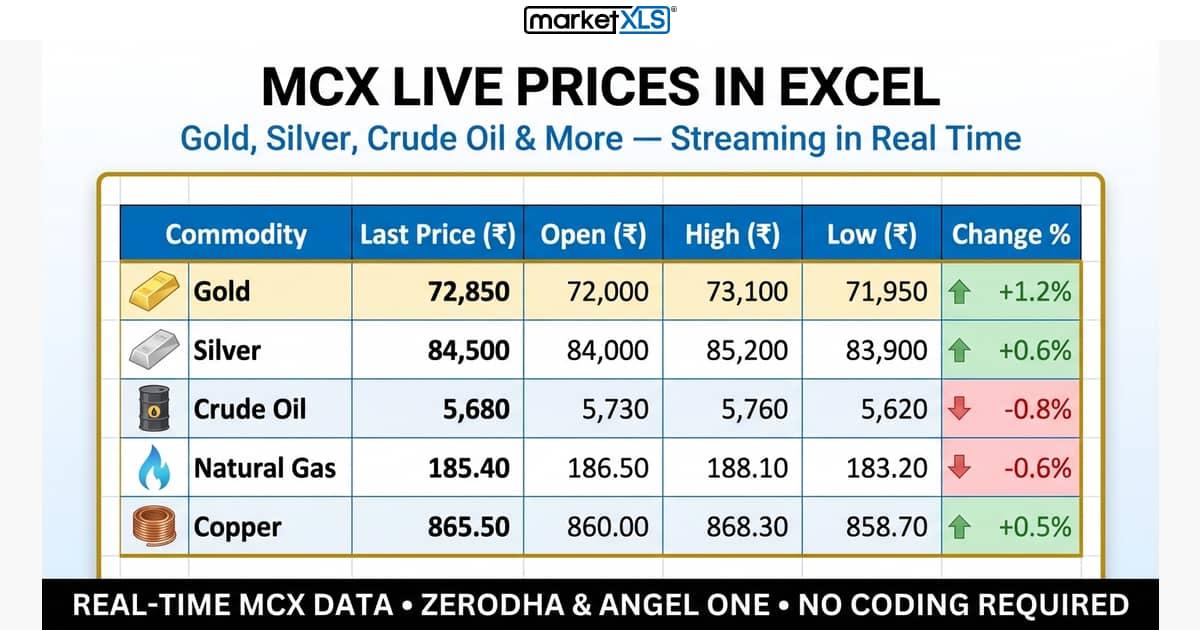
Why MCX Data in Excel?
If you trade commodities on MCX, you already know the pain. Broker terminals show live prices, but the moment you want to build a custom watchlist, run calculations across multiple contracts, or track your positions with real P&L — you are stuck copy-pasting numbers.
MCX Bhavcopy gives you end-of-day data. Fine for backtesting. Useless for live trading.
The Kite Connect API and Angel One SmartAPI can stream MCX data, but they require Python, WebSocket code, and server infrastructure. Most commodity traders are not developers.
MarketXLS India solves this. Type a formula in Excel, and MCX futures prices stream live — gold, silver, crude oil, natural gas, copper, aluminium, and every other MCX contract. No coding. No VBA. No DDE links. Just formulas.
Supported MCX Commodities
MarketXLS India streams live data for every commodity listed on MCX through your Zerodha or Angel One account. Here are the most popular contracts:
Precious Metals
| Commodity | Symbol (Zerodha) | Example Formula |
|---|---|---|
| Gold (1 kg) | GOLD26FEBFUT:MCX | =mxlsIN.ZerodhaLast("GOLD26FEBFUT:MCX") |
| Gold Mini (100g) | GOLDM25SEPFUT:MCX | =mxlsIN.ZerodhaLast("GOLDM25SEPFUT:MCX") |
| Gold Petal (1g) | GOLDPETAL25SEPFUT:MCX | =mxlsIN.ZerodhaLast("GOLDPETAL25SEPFUT:MCX") |
| Gold Guinea (8g) | GOLDGUINEA25SEPFUT:MCX | =mxlsIN.ZerodhaLast("GOLDGUINEA25SEPFUT:MCX") |
| Silver (30 kg) | SILVER25DECFUT:MCX | =mxlsIN.ZerodhaLast("SILVER25DECFUT:MCX") |
| Silver Mini (5 kg) | SILVERM25SEPFUT:MCX | =mxlsIN.ZerodhaLast("SILVERM25SEPFUT:MCX") |
| Silver Micro (1 kg) | SILVERMIC25SEPFUT:MCX | =mxlsIN.ZerodhaLast("SILVERMIC25SEPFUT:MCX") |
Energy
| Commodity | Symbol (Zerodha) | Example Formula |
|---|---|---|
| Crude Oil | CRUDEOIL25SEPFUT:MCX | =mxlsIN.ZerodhaLast("CRUDEOIL25SEPFUT:MCX") |
| Crude Oil Mini | CRUDEOILM25SEPFUT:MCX | =mxlsIN.ZerodhaLast("CRUDEOILM25SEPFUT:MCX") |
| Natural Gas | NATURALGAS25SEPFUT:MCX | =mxlsIN.ZerodhaLast("NATURALGAS25SEPFUT:MCX") |
| Natural Gas Mini | NATGASMINI25SEPFUT:MCX | =mxlsIN.ZerodhaLast("NATGASMINI25SEPFUT:MCX") |
Base Metals
| Commodity | Symbol (Zerodha) | Example Formula |
|---|---|---|
| Copper | COPPER25SEPFUT:MCX | =mxlsIN.ZerodhaLast("COPPER25SEPFUT:MCX") |
| Aluminium | ALUMINIUM25SEPFUT:MCX | =mxlsIN.ZerodhaLast("ALUMINIUM25SEPFUT:MCX") |
| Nickel | NICKEL25SEPFUT:MCX | =mxlsIN.ZerodhaLast("NICKEL25SEPFUT:MCX") |
| Zinc | ZINC25SEPFUT:MCX | =mxlsIN.ZerodhaLast("ZINC25SEPFUT:MCX") |
| Lead | LEAD25SEPFUT:MCX | =mxlsIN.ZerodhaLast("LEAD25SEPFUT:MCX") |
Agricultural
| Commodity | Symbol (Zerodha) | Example Formula |
|---|---|---|
| Cotton | COTTON25NOVFUT:MCX | =mxlsIN.ZerodhaLast("COTTON25NOVFUT:MCX") |
| Cardamom | CARDAMOM25SEPFUT:MCX | =mxlsIN.ZerodhaLast("CARDAMOM25SEPFUT:MCX") |
| Mentha Oil | MENTHAOIL25SEPFUT:MCX | =mxlsIN.ZerodhaLast("MENTHAOIL25SEPFUT:MCX") |
Understanding MCX Symbol Format
MCX symbols follow a specific pattern. Understanding this lets you stream any contract, not just the ones listed above.
Futures Symbol Format
{COMMODITY}{YY}{MMM}FUT
Examples:
GOLD26FEB+FUT=GOLD26FEBFUT(Gold February 2026 Futures)CRUDEOIL25SEP+FUT=CRUDEOIL25SEPFUT(Crude Oil September 2025 Futures)SILVER25DEC+FUT=SILVER25DECFUT(Silver December 2025 Futures)
Append :MCX to be explicit about the exchange: GOLD26FEBFUT:MCX
Options Symbol Format
MCX options use the standard MarketXLS options format:
@{COMMODITY}{YYMMDD}{C/P}{STRIKE x 1000, padded to 8 digits}
Examples:
- Gold 75000 CE expiring Feb 5, 2026:
@GOLD260205C75000000 - Crude Oil 5700 CE expiring Feb 17, 2026:
@CRUDEOIL260217C05700000 - Silver 90000 PE expiring Dec 5, 2025:
@SILVER251205P90000000
You can also use the raw Zerodha symbol: CRUDEOIL26FEB5700CE:MCX
Step-by-Step Setup
Step 1: Install MarketXLS India
- Open Excel (desktop or web)
- Go to Insert > Get Add-ins
- Search for MarketXLS India
- Click Add and sign in with your MarketXLS India credentials
Step 2: Connect Your Broker
MarketXLS India works with both Zerodha and Angel One for MCX data.
For Zerodha:
- Open the MarketXLS India sidebar in Excel
- Click Connect Zerodha
- Log in with your Zerodha credentials
- Authorize the connection
For Angel One:
- Open the MarketXLS India sidebar
- Click Connect Angel One
- Enter your Client ID, Password, API Key, and TOTP
- Connection is established automatically
Once connected, you are ready to stream MCX data.
Step 3: Type Your First Formula
In any cell, type:
=mxlsIN.ZerodhaLast("GOLD26FEBFUT:MCX")
The cell will show "Loading..." briefly, then display the live gold futures price. It updates automatically as the market moves.
Available Data Points
Every MCX contract supports these streaming data points:
| Data Point | Zerodha Formula | Angel One Formula |
|---|---|---|
| Last Traded Price | =mxlsIN.ZerodhaLast("SYMBOL") | =mxlsIN.AngelOneLast("SYMBOL") |
| Open | =mxlsIN.ZerodhaOpen("SYMBOL") | =mxlsIN.AngelOneOpen("SYMBOL") |
| High | =mxlsIN.ZerodhaHigh("SYMBOL") | =mxlsIN.AngelOneHigh("SYMBOL") |
| Low | =mxlsIN.ZerodhaLow("SYMBOL") | =mxlsIN.AngelOneLow("SYMBOL") |
| Close (Prev) | =mxlsIN.ZerodhaClose("SYMBOL") | =mxlsIN.AngelOneClose("SYMBOL") |
| Volume | =mxlsIN.ZerodhaVolume("SYMBOL") | =mxlsIN.AngelOneVolume("SYMBOL") |
| Buy Qty | =mxlsIN.ZerodhaBuyQty("SYMBOL") | =mxlsIN.AngelOneBuyQty("SYMBOL") |
| Sell Qty | =mxlsIN.ZerodhaSellQty("SYMBOL") | =mxlsIN.AngelOneSellQty("SYMBOL") |
Replace SYMBOL with any MCX symbol like GOLD26FEBFUT:MCX or CRUDEOIL25SEPFUT:MCX.
Build a Live MCX Commodity Dashboard
Here is a practical commodity watchlist you can build in minutes.
Layout
| A | B | C | D | E | F | G | |
|---|---|---|---|---|---|---|---|
| 1 | Commodity | Contract | Last | Open | High | Low | Change % |
| 2 | Gold | GOLD26FEBFUT:MCX | |||||
| 3 | Silver | SILVER25DECFUT:MCX | |||||
| 4 | Crude Oil | CRUDEOIL25SEPFUT:MCX | |||||
| 5 | Natural Gas | NATURALGAS25SEPFUT:MCX | |||||
| 6 | Copper | COPPER25SEPFUT:MCX |
Formulas (Row 2 — Gold)
C2: =mxlsIN.ZerodhaLast(B2)
D2: =mxlsIN.ZerodhaOpen(B2)
E2: =mxlsIN.ZerodhaHigh(B2)
F2: =mxlsIN.ZerodhaLow(B2)
G2: =IF(AND(ISNUMBER(C2),ISNUMBER(F2),F2<>0), (C2-D2)/D2*100, "—")
Copy the formulas down for rows 3-6. Every cell references column B, so just change the contract symbol in column B to track any MCX commodity.
Add Conditional Formatting
- Select column G (Change %)
- Apply Green fill for values > 0
- Apply Red fill for values < 0
You now have a live, colour-coded MCX commodity dashboard.
MCX Options Trading in Excel
Track MCX commodity options alongside futures for a complete derivatives view.
Example: Crude Oil Options
| Strike | Call LTP | Put LTP | |
|---|---|---|---|
| 1 | 5500 | =mxlsIN.ZerodhaLast("@CRUDEOIL260217C05500000") | =mxlsIN.ZerodhaLast("@CRUDEOIL260217P05500000") |
| 2 | 5600 | =mxlsIN.ZerodhaLast("@CRUDEOIL260217C05600000") | =mxlsIN.ZerodhaLast("@CRUDEOIL260217P05600000") |
| 3 | 5700 | =mxlsIN.ZerodhaLast("@CRUDEOIL260217C05700000") | =mxlsIN.ZerodhaLast("@CRUDEOIL260217P05700000") |
| 4 | 5800 | =mxlsIN.ZerodhaLast("@CRUDEOIL260217C05800000") | =mxlsIN.ZerodhaLast("@CRUDEOIL260217P05800000") |
This gives you a live options chain for crude oil — something you cannot get from MCX Bhavcopy or any free tool.
MCX vs Bhavcopy: Why Live Data Wins
| Feature | MCX Bhavcopy | MarketXLS India |
|---|---|---|
| Data Freshness | End of day | Real-time streaming |
| Format | CSV download | Live in Excel |
| Automation | Manual download daily | Automatic |
| Options Data | Settlement prices only | Live LTP, volume, OI |
| Custom Dashboards | Not possible | Fully customisable |
| Historical + Live | Either/or | Both |
| Cost | Free | From Rs 3,500/month |
Bhavcopy is useful for end-of-day record keeping. For active trading decisions, you need live data.
Zerodha vs Angel One for MCX Data
Both brokers are supported. Here is how they compare for MCX commodity streaming:
| Feature | Zerodha (Kite) | Angel One (SmartAPI) |
|---|---|---|
| MCX Futures | All contracts | All contracts |
| MCX Options | All strikes | All strikes |
| MCX Indices | Supported | Supported |
| Formula Prefix | mxlsIN.Zerodha* | mxlsIN.AngelOne* |
| Connection | Kite login | SmartAPI credentials |
| Brokerage | Rs 20/order | Rs 20/order or free |
| API Reliability | Excellent | Excellent |
Recommendation: Use whichever broker you already have an account with. Both deliver the same MCX data through MarketXLS India.
Practical Use Cases
1. Gold-Silver Ratio Tracker
The gold-silver ratio tells you how many ounces of silver it takes to buy one ounce of gold. It is a popular indicator for precious metals traders.
Gold LTP:    =mxlsIN.ZerodhaLast("GOLD26FEBFUT:MCX")
Silver LTP:  =mxlsIN.ZerodhaLast("SILVER25DECFUT:MCX")
Ratio:       =B1/B2
2. Crude Oil Spread Monitor
Track the spread between different crude oil contract months for calendar spread trading.
Near Month:  =mxlsIN.ZerodhaLast("CRUDEOIL25SEPFUT:MCX")
Far Month:   =mxlsIN.ZerodhaLast("CRUDEOIL25OCTFUT:MCX")
Spread:      =B1-B2
3. Multi-Commodity P&L Tracker
| Commodity | Entry | Lots | Lot Size | LTP | P&L |
|---|---|---|---|---|---|
| Gold | 72500 | 2 | 100g | =mxlsIN.ZerodhaLast("GOLD26FEBFUT:MCX") | =(E2-B2)*C2*D2 |
| Crude Oil | 5600 | 5 | 100 bbl | =mxlsIN.ZerodhaLast("CRUDEOIL25SEPFUT:MCX") | =(E3-B3)*C3*D3 |
| Silver | 85000 | 1 | 30 kg | =mxlsIN.ZerodhaLast("SILVER25DECFUT:MCX") | =(E4-B4)*C4*D4 |
Your P&L updates live as prices move. No manual refresh needed.
Tips for MCX Trading in Excel
1. Use the :MCX suffix — While many MCX symbols work without the suffix, adding :MCX ensures the symbol resolves to the commodity exchange and not an equity with a similar name.
2. Update contract symbols on expiry — MCX futures expire monthly or bi-monthly. When your current contract expires, update the symbol in your spreadsheet to the next month's contract.
3. MCX trading hours differ from equity — MCX commodities trade from 9:00 AM to 11:30 PM IST (Monday-Friday). Your Excel data will stream during these hours.
4. Start with the most liquid contracts — Gold, Silver, Crude Oil, and Natural Gas have the highest volumes. These will have the tightest spreads and most reliable streaming data.
Frequently Asked Questions
Can I get MCX data without a broker account?
No. MarketXLS India streams data through your broker's WebSocket connection (Zerodha Kite or Angel One SmartAPI). You need an active trading account with either broker.
Is there a limit on how many MCX symbols I can stream?
Zerodha supports up to 3,000 instruments per session. Angel One supports up to 1,000 per WebSocket connection. For a typical commodity watchlist of 10-20 contracts, you will never hit this limit.
Does MCX data work on Excel Online (web)?
Yes. MarketXLS India works on Excel desktop (Windows/Mac) and Excel Online through Office 365. The streaming formulas are identical.
Can I export MCX data to CSV?
Yes. Once the data is streaming in Excel, use File > Save As > CSV to export a snapshot. For automated CSV exports, you can combine MarketXLS formulas with Excel's built-in macro recorder to save at intervals.
What about MCX historical data?
This guide covers live streaming. For historical MCX OHLCV data, MarketXLS provides separate historical data functions. Check the MarketXLS India documentation for details.
How much does it cost?
MarketXLS India subscriptions start at Rs 3,500/month with a lifetime price lock. This includes live streaming for all exchanges — NSE, BSE, and MCX. Visit marketxls.in/pricing for current plans.
Get Started
- Subscribe to MarketXLS India (Rs 3,500/month)
- Install the Excel add-in
- Connect your Zerodha or Angel One account
- Start streaming MCX commodity prices
Every formula in this guide works the moment you connect your broker. No setup scripts, no API keys to manage, no server to maintain.
Related Guides:
