Analyst and earnings functions template
Analyst Coverage Functions
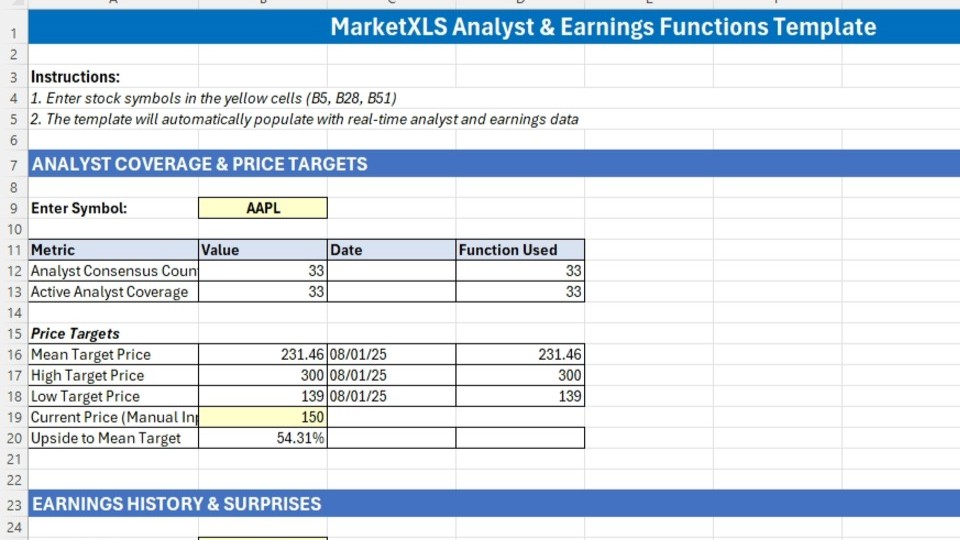
These functions provide data on the number of analysts covering a stock.
=AnalystConsensus(Symbol): Returns the number of analysts whose estimates are included in the consensus figures.
Example:
=AnalystConsensus(“AAPL”) returns the number of analysts whose estimates are included in the consensus figures for Apple.
Price Target Functions
These functions return the consensus price targets for a stock.
=TargetPrice(Symbol, [WeeksAgo]): Returns the average (mean) analyst price target. Use the optionalWeeksAgoargument to retrieve historical values. For example, use-1for the target from one week ago.=TargetPriceHigh(Symbol): Returns the highest analyst price target.=TargetPriceLow(Symbol): Returns the lowest analyst price target.=TargetPriceMean(Symbol): Returns the average (mean) analyst price target.
To get the date of the latest estimate, add “date” as the second argument. For example: =TargetPrice("MSFT", "date").
Recent Earnings Performance
These functions provide key figures from a company’s most recently reported quarter.
=EPSActual(Symbol): Returns the actual EPS the company reported.=EPSEstimate(Symbol): Returns the consensus EPS estimate for the last quarter.=EPSSurprise(Symbol): Returns the dollar difference between actual and estimated EPS.=EPSSurprisePercent(Symbol): Returns the earnings surprise as a percentage.
Example:
=EPSSurprisePercent(“NFLX”) returns the percentage difference between Netflix’s actual and estimated EPS for the last reported quarter.
Forward-Looking Earnings Estimates
These functions provide consensus earnings estimates for future periods.
For Quarters and Years
=EPSEstimateCurrentQ(Symbol): Returns the consensus EPS estimate for the current quarter.=EPSEstimateNextQ(Symbol): Returns the consensus EPS estimate for the next quarter.=EPSEstimateCurrentY(Symbol): Returns the consensus EPS estimate for the current fiscal year.=EPSEstimateNextY(Symbol): Returns the consensus EPS estimate for the next fiscal year.
For Long-Term Growth
=EPSGrowth5Y(Symbol): Returns the consensus forecast for the average annual EPS growth rate over the next five years.
Putting the Functions to Use
The following examples demonstrate how to combine these functions in a spreadsheet.
Earnings Surprise Analysis
Track recent performance with the following structure.
SymbolActual EPSEstimateSurprise %GOOGL=EPSActual(A2)=EPSEstimate(A2)=EPSSurprisePercent(A2)
Price Target Analysis
Compare a stock’s price to analyst targets.
SymbolCurrent PriceLow TargetMean TargetHigh TargetTSLA[Market Price]=TargetPriceLow(A2)=TargetPrice(A2)=TargetPriceHigh(A2)
Created by: Ankur

I invite you to book a demo with me or my team to save time, enhance your investment research, and streamline your workflows.