
Black Scholes Excel
The Black-Scholes model calculates the theoretical value of an option from five inputs: stock price, strike price, time to expiration, risk-free interest rate, and volatility. In Excel, MarketXLS returns the model value for a listed contract with =BlackScholesOptionModelValue("Option Symbol"), or from your own inputs with =BlackScholesOptionValueWithUserInputs(StockPrice, Strike, Days, Rate, Volatility, CallPut).
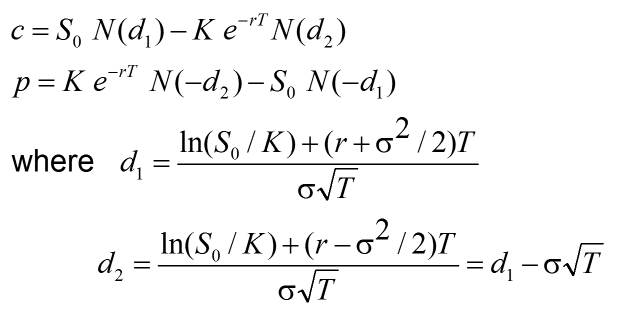
How the Black-Scholes formula works
The Black-Scholes formula, also called the Black-Scholes-Merton formula, is a mathematical model for valuing an option contract. MarketXLS includes the Black-Scholes Excel model described on this page as a template.
The model answers one question: given today's inputs, what should this option be worth? Traders compare that theoretical value with the market price.
The Black-Scholes formula uses the inputs that drive the value of an option contract:
stock price (the price of the underlying asset); exercise price (the option's strike price); the risk-free interest rate; time to expiration; and volatility (the standard deviation of the stock's log returns). With other inputs equal, a more volatile stock makes the option more valuable.
Where :
c > Call Premium
So > Current Stock Price
T > Time to expiration
K > Option Strike price
r > Risk-free interest rate
N > Cumulative standard normal distribution
e > Exponential Term
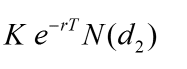
The second part of the Black Scholes Excel formula shown below discounts the strike price to the present value.
The second part of the Black Scholes Excel formula shown below discounts the strike price to the present value.
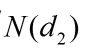
The probability that the stock price will be at or above the strike price when the option expires is calculated by the part below.
The future value of the stock if, and only if, the stock price is above the strike price at expiration is calculated as shown below.

Options give leverage, and the leverage options provide also comes with risks. MarketXLS Option Templates combine the model with option data in Excel so you can check your own calculations. This page is educational and is not investment advice.
How to calculate the Black-Scholes value in Excel with MarketXLS
MarketXLS returns the model value of a listed option contract with one function:
=BlackScholesOptionModelValue(“Option Symbol”)
returns the model value using the dividend yield of the underlying asset, 7-trading-day historical volatility, and an expected rate of return of 5%.Compare the model value with the option's last price to see whether the market prices the contract above or below the model.
To use your own volatility and rate assumptions, use =BlackScholesOptionValueWithUserInputs(StockPrice, Strike, Days, Rate, Volatility, CallPut).
Compare MarketXLS pricing plans.
Call: 1-877-778-8358 
I'm Ankur, the founder and CEO of MarketXLS. Our team can demonstrate how MarketXLS brings market data and research tools into Excel.
Book a demo with our team to explore the features and workflows relevant to your research.
Book a demo with our team to explore the features and workflows relevant to your research.
Implement "your own" investment strategies in Excel with thousands of MarketXLS functions and templates.
I use MarketXLS to manage my personal portfolio. I can easily pull in stock quotes, betas, and dividends. I also like to access historical closing prices on a particular date. That makes tracking performance easy.
I have used lots of stock and option information services. This is the only one which gives me what I need inside Excel.
I can now concentrate on manipulating financial data, valuing stocks and making investment decisions, rather than hacking around with VBA or copying and pasting data from websites.
I have been using MarketXLS for the last 6+ years and they really enhanced the product every year.
I Love My MarketXLS. The market speaks to you when you know how to listen. With MarketXLS, the market truly does speak. Patterns emerge. Pricing behavior becomes clearer.