

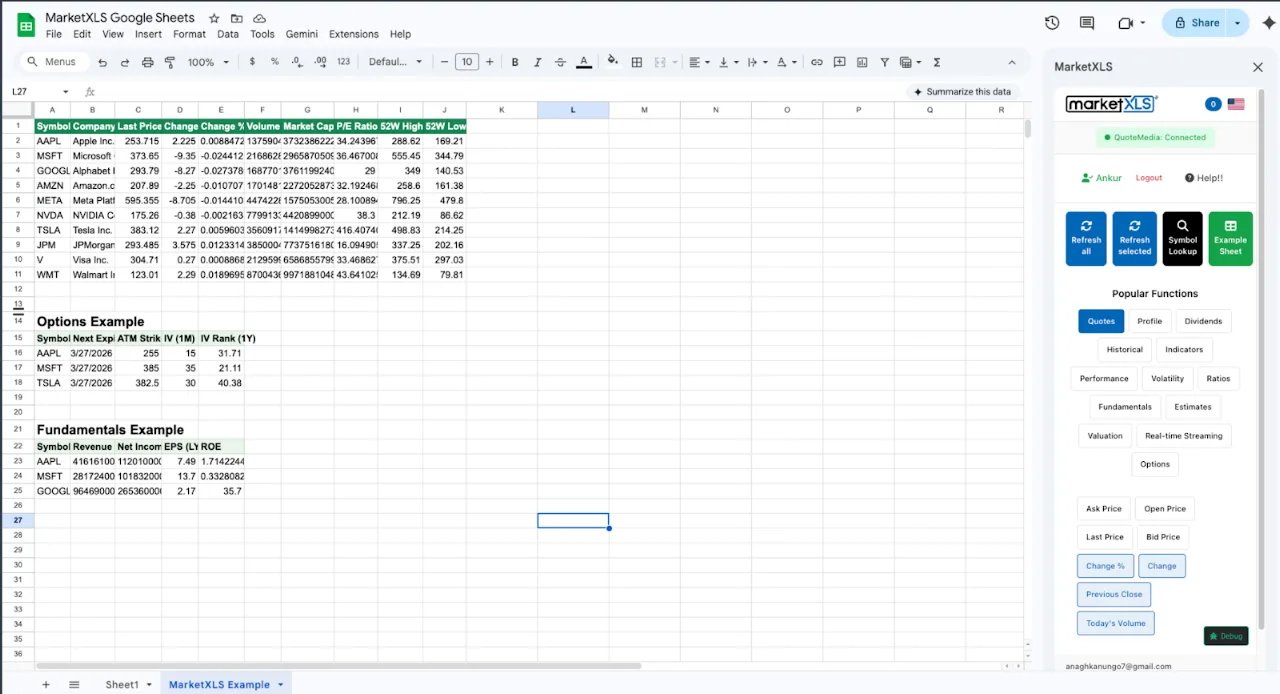
To get a stock price in Google Sheets, type =GOOGLEFINANCE("AAPL") in a cell. It is free and built in, but quotes can be delayed up to 20 minutes and it has no bid/ask, dividend, financial statement, or options data. For those, install the MarketXLS add-on for Google Sheets and use =Last("AAPL"), which returns real-time prices on the Advanced and Business plans and 15-minute delayed prices on the Standard plan.
This guide covers GOOGLEFINANCE syntax, its limits, and the MarketXLS functions for quotes, history, fundamentals, technical indicators, and options in Google Sheets.
How to Get Stock Price in Google Sheets with GOOGLEFINANCE
The simplest way to get a stock price in Google Sheets is the built-in GOOGLEFINANCE function:
=GOOGLEFINANCE("AAPL")
This returns the current price for Apple stock. You can also specify the attribute:
=GOOGLEFINANCE("AAPL", "price")
=GOOGLEFINANCE("AAPL", "priceopen")
=GOOGLEFINANCE("AAPL", "high")
=GOOGLEFINANCE("AAPL", "low")
=GOOGLEFINANCE("AAPL", "volume")
=GOOGLEFINANCE("AAPL", "marketcap")
=GOOGLEFINANCE("AAPL", "pe")
=GOOGLEFINANCE("AAPL", "eps")
=GOOGLEFINANCE("AAPL", "high52")
=GOOGLEFINANCE("AAPL", "low52")
For historical stock prices in Google Sheets, you can add date parameters:
=GOOGLEFINANCE("AAPL", "close", DATE(2025,1,1), DATE(2025,12,31), "DAILY")
This returns a table of daily closing prices for Apple in 2025.
Why GOOGLEFINANCE Falls Short for Stock Prices in Google Sheets
GOOGLEFINANCE is fine for checking a single price, but it has seven limits that matter once you build a tracker or model.
1. Stock Price Data is Delayed Up to 20 Minutes
The stock prices from GOOGLEFINANCE are not real-time. Google states that quotes may be delayed up to 20 minutes. You cannot change this. There is no setting to enable real-time stock prices in Google Sheets using GOOGLEFINANCE. For anyone making trading decisions or monitoring a portfolio during the trading day, this delay makes the data unreliable.
2. Only About 18 Attributes Available
GOOGLEFINANCE gives you roughly 18 data attributes for stocks: price, open, high, low, volume, market cap, PE, EPS, 52-week high/low, change, change percent, previous close, shares outstanding, currency, trade time, data delay, and average volume. That is the entire list. There are no financial statements, no cash flow data, no dividend details, no technical indicators, and no options data.
3. Frequent Errors and Missing Data
Sheets with many GOOGLEFINANCE formulas often show #N/A errors, stale values, or tickers that stop returning data. There is no official SLA or support from Google for this function.
4. No Options Data in Google Sheets
GOOGLEFINANCE has zero support for options data. You cannot get option chains, strike prices, expiration dates, implied volatility, or Greeks using GOOGLEFINANCE. If you trade options and want to track them in Google Sheets, GOOGLEFINANCE cannot help you at all.
5. No Financial Statements
You cannot pull revenue, net income, balance sheet data, or cash flow statements using GOOGLEFINANCE. The function gives you PE ratio and EPS, but nothing deeper. For fundamental analysis in Google Sheets, you need a different tool.
6. No Technical Indicators
Building technical indicators like RSI, MACD, or moving averages from GOOGLEFINANCE data requires complex manual formulas. There is no built-in way to get =RSI("AAPL") or =SimpleMovingAverage("AAPL", 50) from GOOGLEFINANCE. You would have to pull historical prices and build the indicator calculations yourself, which is tedious and error-prone.
7. Cannot Control Refresh Timing
GOOGLEFINANCE refreshes on its own schedule. You cannot force a refresh or control when stock prices update in your Google Sheets spreadsheet. Sometimes the data updates every few minutes, sometimes it takes much longer.
How to Get Real-Time Stock Prices in Google Sheets with MarketXLS
MarketXLS for Google Sheets is an add-on that adds financial-data functions (the site lists 1,000+) for quotes, options, fundamentals, and technical indicators. You install it from the Google Workspace Marketplace and write formulas the same way you would with GOOGLEFINANCE. Quote data comes from QuoteMedia. Speed depends on your plan: US stock quotes are 15-minute delayed on Standard and real-time on Advanced and Business.
Get Real-Time Stock Prices
To get a real-time stock price in Google Sheets with MarketXLS:
=Last("AAPL")
Formula documentation: Last
One formula returns the current stock price (real-time on Advanced and Business, 15-minute delayed on Standard).
For QuoteMedia quotes, you can also use:
=QM_Last("AAPL")
Formula documentation: QM_Last
The QM_Last function pulls the latest traded price from QuoteMedia, subject to the same plan-based delay.
More Stock Price Functions
MarketXLS price functions in Google Sheets:
=Last("AAPL")              // Last traded price
=Bid("AAPL")               // Current bid price
=Ask("AAPL")               // Current ask price
=Volume("AAPL")            // Trading volume
=DaysHigh("AAPL")          // Today's high
=DaysLow("AAPL")           // Today's low
=PreviousClose("AAPL")     // Yesterday's close
=OpenPrice("AAPL")         // Today's open
=ChangeinPercent("AAPL")   // % change from close
=DaysRange("AAPL")         // Today's range
=FiftyTwo_weekHigh("AAPL") // 52-week high
=FiftyTwo_weekLow("AAPL")  // 52-week low
Formula documentation: Last, Bid, Ask, Volume, DaysHigh, DaysLow, PreviousClose, OpenPrice, ChangeinPercent, DaysRange, FiftyTwo_weekHigh, FiftyTwo_weekLow
QuoteMedia (QM_) quote functions:
=QM_Last("AAPL")           // Real-time last price
=QM_Bid("AAPL")            // Real-time bid
=QM_Ask("AAPL")            // Real-time ask
=QM_Change("AAPL")         // Real-time change
=QM_ChangePercent("AAPL")  // Real-time % change
=QM_ShareVolume("AAPL")    // Real-time volume
=QM_MarketCap("AAPL")      // Real-time market cap
Formula documentation: QM_Last, QM_Bid, QM_Ask, QM_Change, QM_ChangePercent, QM_ShareVolume, QM_MarketCap
Historical Stock Prices in Google Sheets
For historical stock price data in Google Sheets, MarketXLS provides:
=QM_GetHistory("AAPL")
Formula documentation: QM_GetHistory
This returns a full table of historical prices with open, high, low, close, and volume. You can also get specific historical prices:
=Close_Historical("AAPL", "2024-01-15")
=Open_Historical("AAPL", "2024-01-15")
=High_Historical("AAPL", "2024-01-15")
=Low_Historical("AAPL", "2024-01-15")
Formula documentation: Close_Historical, Open_Historical, High_Historical, Low_Historical
Build a Stock Price Tracker in Google Sheets
Here is how to build a simple stock price tracker in Google Sheets using MarketXLS:
Column A: Stock symbols (AAPL, MSFT, GOOGL, AMZN, TSLA)
Column B: =Last(A2) for current price
Column C: =ChangeinPercent(A2) for daily change
Column D: =Volume(A2) for trading volume
Column E: =PERatio(A2) for P/E ratio
Column F: =DividendYield(A2) for dividend yield
Column G: =FiftyTwo_weekHigh(A2) for 52-week high
Column H: =FiftyTwo_weekLow(A2) for 52-week low
Copy these formulas down for each stock in your list. The result is a stock tracker with prices, key ratios, and dividend yields. GOOGLEFINANCE alone cannot fill column F because it does not return dividend yield.
Go Beyond Stock Prices in Google Sheets
MarketXLS in Google Sheets also returns fundamentals, technical indicators, options chains, and dividend data.
Fundamental Analysis in Google Sheets
Pull complete financial statements into Google Sheets:
=hf_revenue("AAPL", 2024)           // Annual revenue
=hf_net_income("AAPL", 2024)        // Net income
=hf_gross_profit("AAPL", 2024)      // Gross profit
=hf_ebit("AAPL", 2024)              // EBIT
=hf_total_assets("AAPL", 2024)      // Total assets
=hf_total_debt("AAPL", 2024)        // Total debt
=hf_free_cash_flow("AAPL", 2024)    // Free cash flow
=hf_cash_and_equivalents("AAPL", 2024) // Cash on hand
Formula documentation: hf_revenue, hf_net_income, hf_gross_profit, hf_ebit, hf_total_assets, hf_total_debt, hf_free_cash_flow, hf_cash_and_equivalents
The hf_ historical fundamental functions cover income statement, balance sheet, and cash flow items by year and quarter. GOOGLEFINANCE has none of this.
Technical Indicators in Google Sheets
Calculate technical indicators with simple formulas:
=RSI("AAPL")                         // Relative Strength Index
=SimpleMovingAverage("AAPL", 50)     // 50-day SMA
=ExponentialMovingAverage("AAPL", 12) // 12-day EMA
=MACD("AAPL")                        // MACD
=BollingerBand("AAPL", 20)           // Bollinger Bands
=AverageTrueRange("AAPL")            // ATR
=VWAP("AAPL")                        // VWAP
=Stochastic("AAPL")                  // Stochastic Oscillator
Formula documentation: RSI, SimpleMovingAverage, ExponentialMovingAverage, AverageTrueRange
No more building complex array formulas from raw historical data. Each indicator is a single function call.
Options Data in Google Sheets
Get full options chain data in Google Sheets:
=QM_GetOptionChain("AAPL")
Formula documentation: QM_GetOptionChain
This returns the options chain with bid, ask, volume, open interest, implied volatility, and Greeks for each strike and expiration. Options data is end-of-day on Standard and real-time on Advanced and Business. GOOGLEFINANCE has no options support.
Dividend Data in Google Sheets
Track dividends for any stock in Google Sheets:
=DividendYield("AAPL")
=DividendPerShare("AAPL")
=Ex_DividendDate("AAPL")
=PayoutRatio("AAPL")
Formula documentation: DividendYield, DividendPerShare, Ex_DividendDate, PayoutRatio
Stock Screening in Google Sheets
MarketXLS includes stock screening functions that filter stocks by dividend yield, value metrics, growth rates, and momentum from inside Google Sheets.
GOOGLEFINANCE vs MarketXLS for Stock Prices in Google Sheets
| Feature | GOOGLEFINANCE | MarketXLS |
|---|---|---|
| Stock price | Up to 20-min delay | =Last(), =QM_Last(): real-time on Advanced/Business, 15-min delayed on Standard |
| Bid/Ask | Not available | =Bid(), =Ask(), =QM_Bid(), =QM_Ask() |
| Historical prices | Basic daily/weekly | Full OHLCV via =QM_GetHistory() |
| Intraday data | Not available | 1-min and 5-min bars via QuoteMedia |
| Financial statements | None | Historical fundamentals (hf_* functions) |
| Technical indicators | None | RSI, SMA, EMA, MACD, Bollinger, ATR, VWAP |
| Options data | None | Chains via =QM_GetOptionChain() (EOD on Standard) |
| Dividend data | None | Yield, per share, ex-date, payout ratio |
| Portfolio analytics | None | Sharpe ratio, Sortino ratio, beta, VaR |
| Stock screener | None | Built-in screening functions |
| Total functions | 1 function, ~18 attributes | 1,000+ functions |
| Data source | QuoteMedia quotes plus MarketXLS fundamentals | |
| Platform | Google Sheets only | Google Sheets and Excel |
How to Get Started
Setting up MarketXLS in Google Sheets takes four steps:
- Install the add-on from the Google Workspace Marketplace
- Get your license from the MarketXLS pricing page
- Enter your license key in the MarketXLS sidebar inside Google Sheets
- Type your first formula:
=Last("AAPL")in any cell
Who Needs Better Stock Prices in Google Sheets
- Active traders who need real-time stock prices (Advanced or Business plan)
- Financial advisors who build client-facing dashboards in Google Sheets and need reliable, professional data
- Options traders who need options chains, Greeks, and implied volatility in Google Sheets
- Dividend investors who want to track yield, ex-dates, and payout ratios in their Google Sheets portfolio tracker
- Portfolio managers who need risk analytics like Sharpe ratio, beta, and Value at Risk
- Chromebook users and Google Workspace teams who work in Google Sheets rather than Excel (Mac users can use either Google Sheets or the MarketXLS Microsoft 365 add-in for Excel)
Frequently Asked Questions
How do I get a stock price in Google Sheets?
The simplest way is =GOOGLEFINANCE("AAPL") for a free but delayed price. For real-time prices (Advanced or Business plan), bid/ask, and fundamentals, install MarketXLS and use =Last("AAPL") or =QM_Last("AAPL").
Can I get real-time stock prices in Google Sheets?
Not with GOOGLEFINANCE, which can be delayed up to 20 minutes. MarketXLS returns real-time stock prices in Google Sheets through =Last("AAPL") and =QM_Last("AAPL") on the Advanced and Business plans. On the Standard plan, quotes are 15-minute delayed.
How do I get stock prices in Google Sheets without GOOGLEFINANCE?
Install the MarketXLS add-on from the Google Workspace Marketplace. MarketXLS provides over 1,000 financial functions including =Last("AAPL") for stock prices, =hf_revenue("AAPL", 2024) for fundamentals, =RSI("AAPL") for technical indicators, and =QM_GetOptionChain("AAPL") for options data.
Why does GOOGLEFINANCE show wrong stock prices?
GOOGLEFINANCE prices can be delayed up to 20 minutes during market hours, so the price you see may not be the current market price. It can also return stale data or #N/A errors, and Google offers no setting to change this.
Can I get options data in Google Sheets?
Not with GOOGLEFINANCE, which has no options support. MarketXLS returns option chain data in Google Sheets with =QM_GetOptionChain("AAPL"), including bid, ask, volume, open interest, Greeks, and implied volatility.
Does MarketXLS work on Mac?
Yes. MarketXLS for Google Sheets works on any device that runs Google Sheets, including Mac, Windows, Chromebook, and Linux, with no software to install. Mac users who prefer Excel can use the MarketXLS Microsoft 365 add-in, where formulas take the mxls. prefix (for example =mxls.Last("AAPL")).
How much does MarketXLS for Google Sheets cost?
MarketXLS for Google Sheets uses the same pricing as regular MarketXLS, and the same plan works for Google Sheets and Excel. US plans start at $70/month billed annually (Standard, delayed quotes); Advanced ($125/month billed annually) adds real-time data. See the pricing page.
Summary
Use =GOOGLEFINANCE("AAPL") when a free, possibly delayed price is enough. Use MarketXLS for Google Sheets when you need bid/ask, dividends, financial statements (hf_* functions), technical indicators like =RSI(), or option chains via =QM_GetOptionChain(). Choose the Advanced or Business plan if you need real-time quotes; Standard quotes are 15-minute delayed.
Get started with MarketXLS for Google Sheets | View Pricing | Install from Google Workspace
